- HubPages»
- Technology»
- Computers & Software»
- Computer Software»
- Digital Photography & Video
Best Free Photo Editing Software | Download and No-Download Free Photo Editor

There are so many photo editing software out there but in this hub, I have listed the best photo editing software free to download and install to make your photos more stunning and beautiful than they’ve been. One from them doesn't even require a download to operate. These photo editor software don’t only create beautiful pictures but can be used easily as well. The best are easy. The best are free. The best creates magic.
The amazing photos you have captured could be edited and retouched to bring the spellbinding effect you want to show and portray. You don’t have to be a professional photographer to capture and create fantastic photos just like those professionally made digital art and photography on magazines and billboards. You don’t have to understand photoshop 101 and undergo tricky training to understand the features and methods these photo editing software I’m gonna list. And you don’t have to own the latest digital SLR to have those realistic pictures on your collections. You don’t even have to go online. Lastly, you don’t have to shop for anything. All you need is to read my hub and download the photo editor program you think would suit your interests and expectations. So here they are…
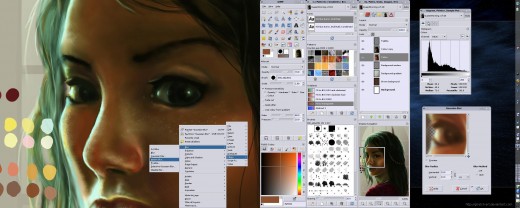
Why should I use GIMP than the others?
- I don’t want to be a beginner forever. By using GIMP software, your expertise to photo editing and architecture will level up from being a beginner to intermediate to an expert.
- Free and easy to install and download the complete version.
- I want high end graphic applications and advanced photo editing interface in creating and editing my photos and images.
- The tutorials are easy and specific.
- I love learning and experimenting batches of edited photos.
GIMP
I listed GIMP as the top from my list of best free photo editing software because it’s more of a complex and professional program designed to create simple photographs into different batches of high quality images. GIMP by the way stands for GNU Image Manipulation Program and is available to download for free whatever versions you want to use and install. Right now, the latest available version is the 2.6 though GIMP has announced they are currently working on finalizing the version 2.8 for a more advanced features like layer groups, improved brushes dynamics, a new unique transformation tool, optional single-window mode and more. This amazing photo editor program can be used for Windows, Mac OS X, and GNU/Linux.
As to Photoshop vs GIMP, I prefer GIMP because of the detailed tutorials. Their user manual is also available to many languages. It supports file formats such as JPEG (JFIF), GIF, PNG, TIFF, PSD. The dazzling photo editing tool can also extend to other compatibilities through its amazing plug-ins. If photography fascinates you and you want to develop your photo editing experience and skills to be more professional and expert, GIMP would be perfect for your needs. Download GIMP now and begin the experience!
Why should I use Picasa than the others?
- It’s so freaking easy to edit, retouch and save photos.
- I can easily sync to my iPhone, iPad and view my photos online and offline
- It’s a photo editor in a click. No headaches.
- Free to download from Google.
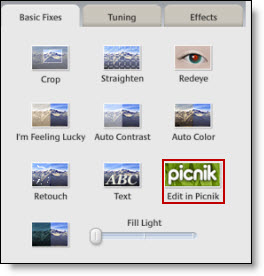
- I can switch and edit in Picnik and Picasa back again.
Picasa
Picasa was acquired by Google in 2004 and it’s now a popular free photo editing software and photo-sharing web in the world. The name was blended from the famous Spanish painter Picasso and ‘pic’ (obviously from pictures) and ‘mi casa’ (meaning my house). With the Picasa Web Album, we can now share our photos and albums to our friends and everyone in the world. With Picasa, no other photo editing software could be used to sync in to your web albums in your iPhone, iPad and other gadgets this easy than Picasa. You can even browse your photos and your friends’ photos even when you’re not online. As one of the best photo editing software, this is so easy and simple to use. This is also compatible with Windows, Mac OS X and Linux. Picasa is totally free to download. The latest version is Picasa 3.8. If you want a photo editor program without learning those complicated tutorials, this one is perfect for you. You can easily crop, edit, retouch, tune color and apply awesome effects to your photos in a click. Easy, simple and accessible, that’s Picasa. You can edit thru Picnik too using this amazing software.

Picnik
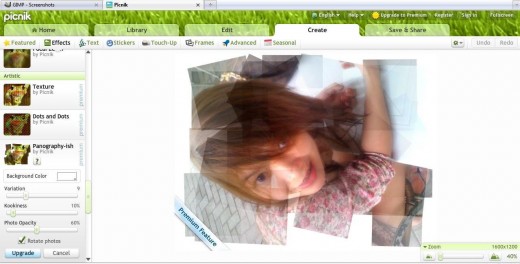
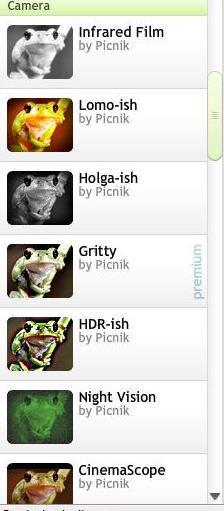
Picnik is a popular photo editing service online. Just like Picasa, you can edit, retouch and beautify your photos using its fabulous features. Some of its features can be used in Flickr photo editor default. Last March, 2010 Picnik was acquired by Google. Picnik offers more advanced effects and tools for its premium members. If you enjoyed using Picasa’s features and Picnik’s tools, you definitely enjoy the stunning effects Picnik offers to its premium members. Just like any other software, this photo editing program works on Windows, Mac and Linux, too. You can import pictures from Facebook, Myspace, Flickr, Yahoo image search and Picasa and edit them in Picnik. This one is known for its magnificent collage maker.
Why should I use Picnik than the others?
- To have another fabulous flavors to your photo editing experience.
- It’s so easy like click and fix.
- Design awesomeness right at your browser.
- It’s free to use, NO DOWNLOAD REQUIRED, no registration.
- It’s so simple to use, you won’t even need a tutorial.
- I loved it the most!